





When someone needs a dentist, a chiropractor or a physical therapist, they don’t usually ask friends first anymore. They pick up their phone and search.
In Tebra’s 2025 survey, 56% of patients said they use Google to look for healthcare providers. And when Patient Prism analyzed millions of calls to US dental practices in 2026, Google sources accounted for 90% of the calls they could trace, with Google Business Profile alone driving 54%.
Put simply: if your practice doesn’t show up well on Google, many patients will never know you exist.
This checklist covers what actually moves the needle for a small practice, in the order we’d tackle it.These steps are part of our practice growth service for dental and wellness clinics.
Part 1: Your Google Business Profile
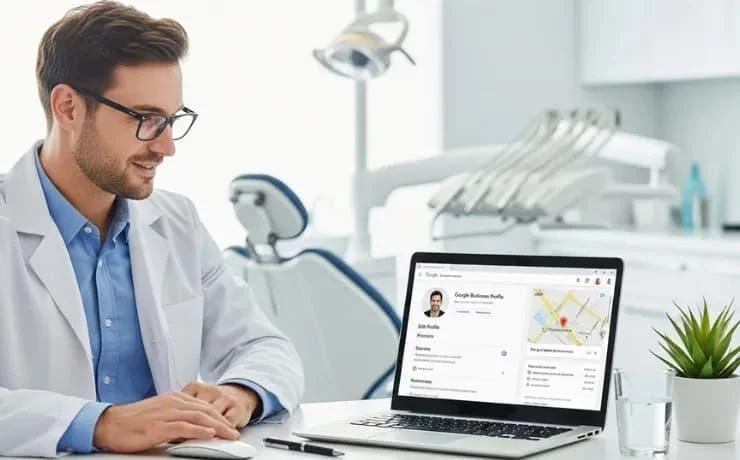
Your Google Business Profile is the box that appears on Google Maps and on the right side of search results, with your hours, photos, reviews and a call button. For local practices, it’s often more important than your website.
Checklist:
- Claim and verify your profile. If you haven’t, do it at google.com/business. Make sure someone at the practice, not just a past marketing company, has owner access.
- Choose the right primary category. “Dentist,” “Cosmetic dentist,” “Chiropractor,” “Physical therapist” and so on. This is one of the strongest signals Google uses. Add secondary categories for other main services.
- Make your name, address and phone number exact. Use your real practice name, without extra keywords stuffed in. Keep the details identical everywhere they appear online.
- Keep your hours accurate, including holiday hours. Wrong hours lead to frustrated patients and bad reviews.
- Add your services. List each main service with a short description.
- Add your booking link. If you take online bookings or appointment requests, link to them directly.
- Upload real photos. The outside of your building (so patients recognize it), your reception area, treatment rooms and team. Add new ones every few months.
- Answer common questions. Parking, insurance, new patient visits and accessibility come up often.
- Post updates occasionally. New services, team news or seasonal reminders show Google and patients that the practice is active.
Part 2: Reviews
Reviews influence both where you rank and whether patients choose you once they see you.
The latest numbers are clear. In rater8’s 2026 survey of nearly 1,000 patients:
- 75% won’t book with a provider rated below 4.0 stars
- 44% expect 4.5 stars or higher
- 66% say how a provider responds to reviews affects their trust
- 68% would leave a review if they were asked
That last number is the opportunity. Most happy patients never leave a review simply because nobody asks.
Checklist:
- Ask every happy patient. The best time is right after a good visit. A short text or email with a direct link to your Google review page works far better than a sign at the front desk.
- Make it a system, not a favor. Decide who asks, when and how, so it happens every day, not only when someone remembers.
- Aim for a steady flow. A few new reviews every week beats a burst once a year. Recent reviews matter: in BrightLocal’s 2026 survey of local consumers, 74% said they focus on reviews from the last three months.
- Respond to reviews, good and bad. In Tebra’s 2025 survey, 70% of patients said a provider’s reply to a negative review improved their opinion of the practice.
- Never confirm someone is a patient in a reply. This is the most important rule for healthcare. Under HIPAA, mentioning that a reviewer is a patient, or any details of their care, can be a privacy violation, even if they shared it first. Practices have been fined for exactly this. Keep replies general: thank them, and invite them to contact the office directly.
A safe reply to a negative review might look like this:
“Thank you for your feedback. We take every concern seriously and would like to understand more. Please call our office manager at [number] so we can talk directly.”
Part 3: Your website
Google looks at your website to understand what you do and where. A strong Google profile linked to a weak website holds you back.
Checklist:
- One page per main service. “Dental implants,” “Invisalign,” “sports massage,” “prenatal chiropractic.” Each page should explain the service clearly and mention the area you serve, naturally.
- Clear location details. Your address, phone number and a map on your contact page and in the footer, matching your Google profile exactly.
- Location pages if you have more than one office. Each location deserves its own page with its own details.
- Good page titles. Each page title should say what the page is about and where, for example “Dental Implants in Plano, TX | Smith Family Dental.”
- Fast on mobile. Most local searches happen on phones. A slow site loses patients and rankings.
- Structured data (schema). Behind-the-scenes code that tells Google your practice type, address, hours and services. Your developer can add it in an afternoon.
- A clear booking button on every page, so the traffic you earn turns into appointments.
Part 4: Listings across the web
Google cross-checks your details against other websites. Inconsistent information creates doubt.
Checklist:
- Search for your practice name and check every listing that comes up: Yelp, Healthgrades, Zocdoc, Facebook, Apple Maps, Bing, insurance directories and local directories.
- Fix any old addresses, phone numbers or practice names, especially if you’ve moved or rebranded.
- Claim your profiles on the main healthcare directories in your field.
Part 5: Get ready for AI search
Patients are starting to ask AI tools like ChatGPT and Google’s AI answers to recommend providers. In rater8’s 2026 survey, 47% of patients had used AI tools to research providers.
These tools pull from the same places Google does: your Google profile, reviews, directories and website. Practices with clear, consistent information and plenty of recent reviews are the ones most likely to be recommended. Everything in this checklist helps with AI search too.
Where to start if you only have an hour
- Log in to your Google Business Profile and check your category, hours, phone number and booking link.
- Upload 5 to 10 real photos.
- Reply to your last 10 reviews, keeping the HIPAA rule in mind.
- Set up a simple daily review request for happy patients.
Those four steps alone put many practices ahead of their local competitors.
The bottom line
Local SEO isn’t a mystery, and it isn’t a one-time project. It’s a set of habits: an accurate Google profile, a steady flow of reviews, a website that clearly explains your services and consistent details everywhere.
Practices that build those habits get found first. Practices that don’t are left wondering why the phone is quiet.
Never miss a new patient call again
Ava answers your missed and after-hours calls and books patients straight into your calendar.
FAQ
Most search online. In Tebra’s 2025 survey, 56% of patients said they use Google to look for healthcare providers. In Patient Prism’s 2026 data, Google sources drove 90% of attributed calls to dental practices.
In rater8’s 2026 survey, 75% of patients said they won’t book with a provider rated below 4.0 stars, and 44% expect 4.5 stars or higher.
Yes, but replies must never confirm that the reviewer is a patient or mention any details of their care. Keep responses general and invite the person to contact the office directly.
Ask every happy patient soon after their visit, ideally by text or email with a direct review link. In rater8’s 2026 survey, 68% of patients said they would leave a review if asked.